
Free Port-In Card for Wireless Stores
This free port-in card for wireless stores puts the account number, transfer PIN and port-out phone for each carrier on one sheet. Build yours below, add your store name, and print it double-sided. Pick from every active carrier we track.
Your card: loading
What goes on a port-in card
Each carrier gets a short block: the network it runs on, the phone number to call, where to find the account number and how to get the transfer PIN. The footer carries the date you built the card and a QR code to the live transfer PIN lookup, so a clerk or customer can confirm any detail before a port.
The card is built in your browser from our carrier dataset and saved as a white-background PDF. You print it on your own printer. Nothing is mailed, shipped or stored.
How to use the port-in card at the counter
- The customer picks your carrier. Ask who they have now.
- Find the old carrier on the card. Have the customer get the account number and transfer PIN from that carrier.
- Start the port from the new carrier, using the old number, account number and PIN.
- Do not cancel the old line first. The FCC advises keeping it active until the new carrier confirms the number moved.
- A simple port must finish within one business day under FCC rules. Wireless-to-wireless moves often finish in hours.
Why ports fail at the counter
Most failed ports come down to three mistakes, and the card is built to catch each one.
- Wrong account number. Some carriers need an extra detail with it. Optimum Mobile, for example, also asks for the zip code on the account. Cox Mobile lines sit on the customer’s Cox account, so the number comes from the Cox bill.
- Wrong or expired PIN. A transfer PIN is not the account PIN. Optimum Mobile’s transfer PIN is good for 7 days, so request it when the customer is ready to switch.
- A protection lock. Cox Mobile’s Number Lock Protection adds an ID scan before it issues the transfer PIN. Finish that scan first, then port.
Carriers the port-in card covers
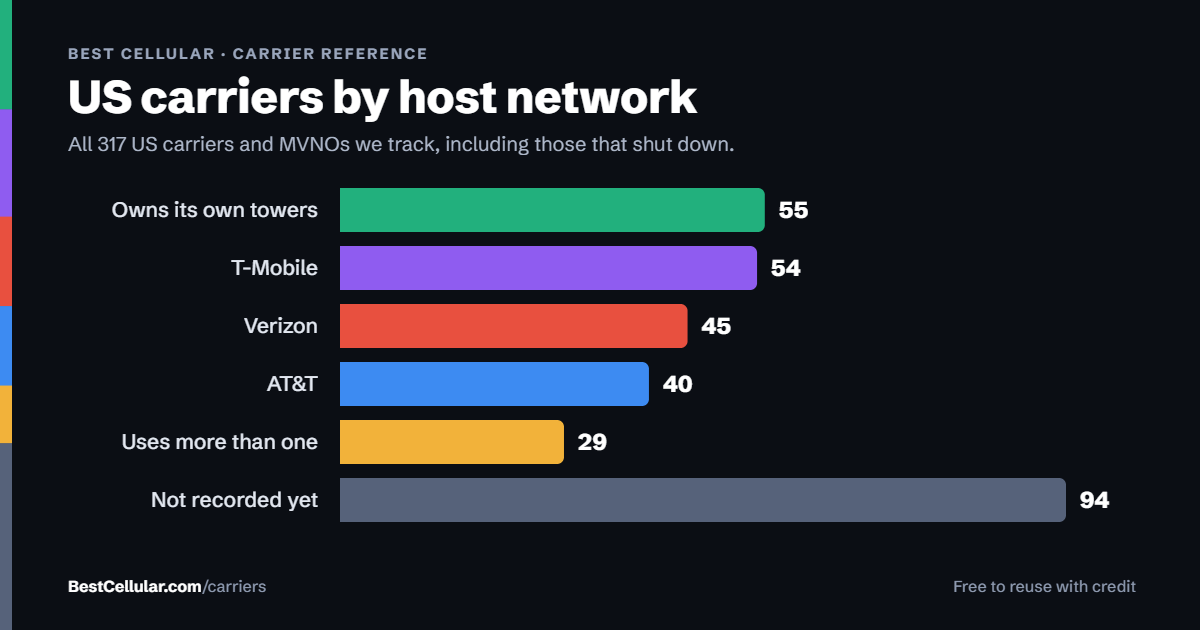
BestCellular.com tracks 317 US carriers, including brands that have shut down. Search lists only the active ones, plus carriers on their own towers or on more than one network. The default card lists the most-ported brands. Search adds any other carrier, and the arrows put your top sellers first.
The rule behind the port-in card
Keeping a number when you change carriers is a federal right, not a carrier policy. The FCC explains it in Portability: Keeping Your Phone Number When Changing Service Providers. Your old company cannot refuse to port a working number, even with an unpaid balance, though it may charge a porting fee.
Questions about the port-in card
Is the port-in card free?
Yes. No sign-up and no fee. Print as many copies as you want.
Do you store my store name or carrier list?
No. The card is built in your browser. Nothing you type is sent to or saved by BestCellular.com.
Who runs BestCellular.com?
BestCellular.com is owned by Assertive Holdings, LLC. It is an independent reference site and is not affiliated with any wireless carrier.
How current is the information?
The card pulls carrier details live from our dataset each time you build it and prints the date on the page. Carriers change their rules, so use the QR code to confirm before a port.