
SIM cards and eSIM
SIM Cards and eSIMs: What You Actually Need
An eSIM is a SIM card built into the phone that the carrier programs over the air, so most switches in the United States now need no physical SIM card at all. Every iPhone sold in the US since the 14 has no SIM tray to put one in.
On this page
- The SIM is not yours
- Most switches need no SIM card at all
- What is an eSIM?
- eSIM vs physical SIM card
- Does your phone have an eSIM?
- Do you need a new SIM card to switch carriers?
- When you do need a physical SIM card
- SIM card sizes
- Why a new SIM card sometimes does not work
- Sprint SIM cards
The SIM is not yours
A SIM card belongs to the carrier that issued it, not to you. You cannot move it to a different carrier. What moves is your phone number, and that happens through a port, using your account number and transfer PIN — not by swapping plastic.
Most switches need no SIM card at all
If your phone supports eSIM, the new carrier activates it over the air, usually in minutes. No shipping, no tray tool. Every iPhone since the XS and most flagship Android phones support it; iPhones sold in the US since the 14 have no SIM tray at all.
What is an eSIM?
An eSIM is a SIM card built into the phone’s hardware. Instead of a plastic card you slide into a tray, the carrier sends a profile that the phone downloads over the air — usually in under five minutes, often by scanning a QR code or tapping a link.
The technical name is eUICC, an embedded universal integrated circuit card. It does exactly the same job as the plastic one: it proves to the network that your line is yours. The difference is only in how it gets onto the phone.
One practical advantage: a phone can hold several eSIM profiles at once and switch between them in Settings. That is how people run a work line and a personal line on one phone, or keep a home number active while using a local plan abroad.
eSIM vs physical SIM card
Both identify your line to the network in exactly the same way. Everything below is about handling, not about how well the phone works.
| eSIM | Physical SIM | |
|---|---|---|
| How you get it | Downloaded over the air, minutes | Shipped, or picked up in a store |
| Moving to a new phone | Transfer in Settings, or ask the carrier to reissue | Move the card, if the sizes match |
| If the phone is lost or stolen | Cannot be pulled out and used in another phone | Can be removed and reused |
| Signal strength | Identical | Identical |
| Second line on one phone | Yes, several profiles at once | Only if the phone has two trays |
| Travelling abroad | Add a local plan without losing your home number | Swap the card and store the original somewhere safe |
| When it goes wrong | Needs the carrier to reissue the profile | Needs a new card in the post |
eSIM does not affect signal strength. This comes up constantly and it is worth being clear about: the SIM identifies your account. It has nothing to do with the antennas, the modem or the bands the phone supports. A weak signal after switching is a coverage, band or VoLTE problem — never the SIM format.
Does your phone have an eSIM?
- iPhone 14 and newer, sold in the US: eSIM only. There is no SIM tray on the phone at all.
- iPhone XS, XR and everything through the iPhone 13: both. A tray and an eSIM.
- Samsung Galaxy and Google Pixel sold in the US: still have a nano-SIM tray, and support eSIM alongside it.
- Budget Android and anything more than a few years old: usually physical only.
To check in thirty seconds: on iPhone open Settings → General → About and look for an EID number. On Android open Settings → About phone → SIM status, or search the settings for “eSIM”. If an EID is listed, the phone supports eSIM.
Do you need a new SIM card to switch carriers?
Usually not. If your phone supports eSIM and the new carrier offers it, nothing physical changes hands. You will not buy a SIM, and you should not need to wait for one in the post.
Here is the part people get backwards. Your phone number does not live on the SIM. It lives on your account with the carrier, and it moves by a process called a port. The SIM — plastic or embedded — is only what the new carrier uses to put your line on their network once the port is authorised.
So the thing you actually need before you switch is not a SIM card. It is two pieces of information from the carrier you are leaving:
- Your account number with that carrier, which is often not the number printed on your bill.
- Your transfer PIN (some carriers call it a port-out PIN, a number transfer PIN or an account password).
Get those two first. A port started without them fails, and a failed port is what strands people between two carriers with a phone that will not make calls.
Step 2Check the phone will work on the new carrierEnter the IMEI. Find out whether the device works on US networks and whether moving it will change your plan. Nothing is stored.Check a phone
Step 3See which network the carrier runs onNearly every brand rents one of three networks. Find out which, then check your own address on that network’s map before you commit.Check a carrier
When you do need a physical SIM card
- Your phone has no eSIM support — common on budget Android models and anything more than a few years old.
- The carrier does not offer eSIM. Several smaller carriers still ship plastic only.
- You are activating a second line on a device that supports only one eSIM profile.
- You are switching a device the carrier cannot verify remotely, such as a tablet, a hotspot or a tracker.
In all four cases the carrier sends the SIM. Buying a blank SIM from a marketplace is almost always a mistake — the carrier has to activate it on your account, and a random SIM off a listing is not.
SIM card sizes
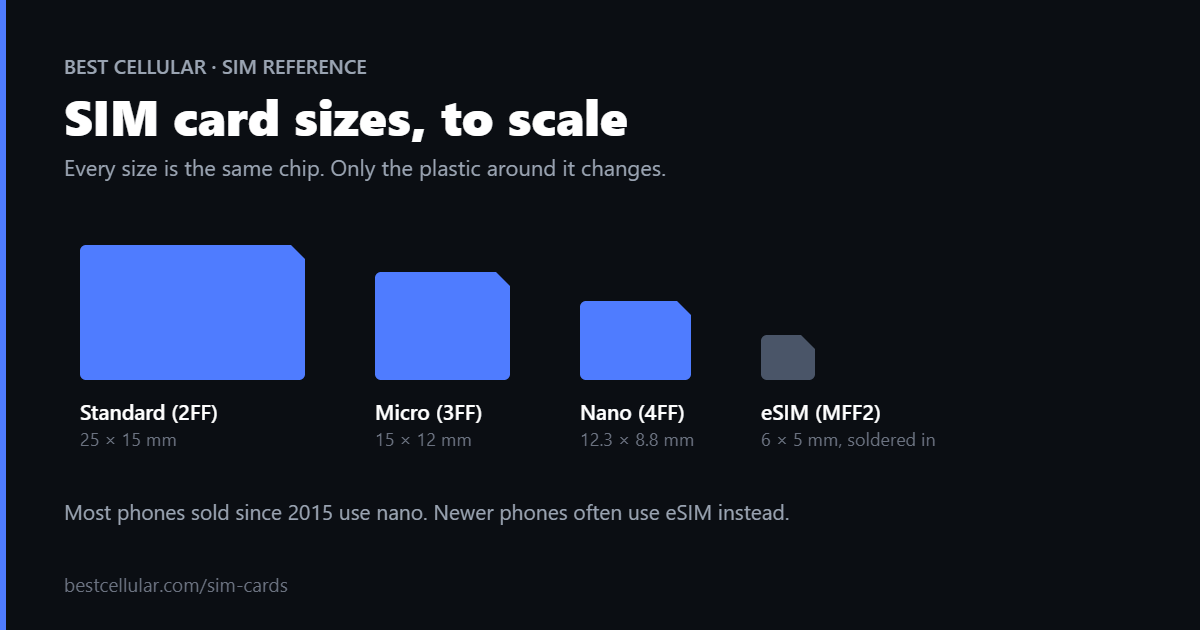
Size is the physical shape of the card, not the network it works on. A SIM that fits is not automatically a SIM that works.
- 2FF — mini SIM, the large original card. Effectively gone from new phones.
- 3FF — micro SIM.
- 4FF — nano SIM. The size every current phone with a tray uses.
- MFF2 — the embedded chip soldered into the device at the factory. This is the eSIM.
Carriers ship one punch-out card that breaks down to whichever size you need, so a modern SIM kit covers all three removable sizes. The dimensions of each size are here.
Why a new SIM card sometimes does not work
- The phone is carrier-locked. Your old carrier has to unlock it. If you are eligible, they must do it free. Ask before you assume you need to pay someone.
- VoLTE is not enabled for your model. A phone missing from the carrier’s VoLTE list gets data and no calls — the single most common “my SIM does not work” complaint.
- The phone is missing bands. An unlocked phone built for one network can be missing bands another relies on, especially mid-band 5G. Coverage looks fine on the map and terrible in your hand.
- The port has not completed. Until the number transfers, the SIM is live on a temporary number. That is normal, not a fault.
Before you buy service, check which network the carrier runs on and whether your phone matches it. The directory lists the host network for every carrier that publishes one.
Sprint SIM cards
Sprint is gone. T-Mobile retired Sprint’s CDMA network on May 31, 2022 and its LTE network on June 30, 2022, so no Sprint SIM activates on any live network. The part numbers are kept as a reference: the Sprint UICC Matrix lists all 57 SKUs, UPCs, form factors and replacements.
Where these standards come from
SIM form factors and the eSIM specification are set by the industry body, not by any one carrier. The GSMA publishes the eSIM specification that every carrier and handset maker builds against. Whether a phone will accept another carrier’s SIM at all is a separate question, covered by the FCC unlocking guidance.