
Here is how to get your Xfinity Mobile account number and transfer PIN, and what to do with them when you move your number to another carrier.
Account Number
In the Xfinity app, select Account, then under Xfinity Mobile select Bill details and View bill to see the full account number. It is separate from your home services account number. Total Wireless describes it as 10 digits, usually starting with 100.
Transfer PIN
Sign in online as the primary or manager user. Go to Devices, pick the line, then Transfer your number, cancel this line. Confirm a one-time passcode and tap Send My PIN to receive the security PIN by text. One PIN covers every line and expires after seven days.
Do not cancel your Xfinity Mobile line first. The transfer closes it for you. Cancelling early releases the number, and once it is released you can lose it.
How to get your Xfinity Mobile transfer PIN
This is the path Xfinity’s own support staff give. It works in the online account; the same flow appears in the Xfinity app.
- Sign in to your Xfinity Mobile account.
- Open the Devices tab.
- Select the device tied to the number you want to move.
- Scroll down to “Transfer your number, cancel this line” and select Learn More.
- Choose an active line and have Xfinity send a one-time passcode to it.
- Enter that passcode and select Confirm Code.
- Send yourself the security PIN by text. That text is your transfer PIN.
The PIN is good for 24 hours and no longer. If it lapses before your new carrier submits the transfer, go back and generate another one — there is no limit on how many times you can do this. One PIN works for any number on the account, so on a family plan you do not need a separate PIN per line.
How to find your Xfinity Mobile account number
Your Xfinity account number appears at the top of your billing statement and in your online account under billing. It is the Xfinity account number, not your phone number and not your mobile device ID.
If you cannot reach the online account — no active line, no recent bill — Xfinity’s stated fallback is to visit an Xfinity Retail Store so they can verify your identity in person. Phone support can confirm the account number but generally will not read out a transfer PIN.
What network does Xfinity Mobile use?
Xfinity Mobile runs on the Verizon network. It is an MVNO: Comcast buys wholesale access to Verizon’s towers and sells service under the Xfinity brand, with Comcast’s own Wi-Fi hotspots layered on top.
That matters when you switch. A phone that worked on Xfinity Mobile is already Verizon-compatible, so Verizon itself and any other Verizon-based MVNO will almost certainly take it. Moving to a carrier on AT&T’s or T-Mobile’s network is a different question — check your IMEI against that carrier’s compatible device list before you commit.
Xfinity Mobile contact information
| Purpose | Contact |
|---|---|
| Customer service | 1-888-936-4968, 24/7 |
| Text support | 1-888-936-4968 |
| Chat | Xfinity Assistant, at xfinity.com |
| Identity verification | Any Xfinity Retail Store |
Porting out of Xfinity Mobile, step by step
- Confirm your phone is paid off and unlocked. A device on an Xfinity device payment plan stays locked until it is paid in full.
- Pick your new carrier and confirm your phone is on its compatible device list.
- Get your Xfinity account number from your bill or online account.
- Generate the transfer PIN using the steps above. Start the transfer the same day.
- Give the new carrier your account number, the PIN, and the billing name and address exactly as Xfinity has them.
- Leave the Xfinity line active and the phone powered on until the new service is working.
One thing specific to Xfinity Mobile: the service requires an active Xfinity Internet subscription. If you are leaving Comcast entirely, sort the mobile transfer out before you cancel the internet, or you may lose access to the account you need to generate the PIN from.
Check coverage before you port
Xfinity Mobile runs on the Verizon network, so the coverage you get at your address is Verizon coverage. Check it on Verizon’s own coverage map before you start the transfer.
Your right to keep the number is federal, not a carrier policy. The rule is the FCC’s: Portability: Keeping Your Phone Number When Changing Service Providers.
Working a counter? The Xfinity Mobile transfer PIN lookup puts these steps on one screen and texts them to the customer.
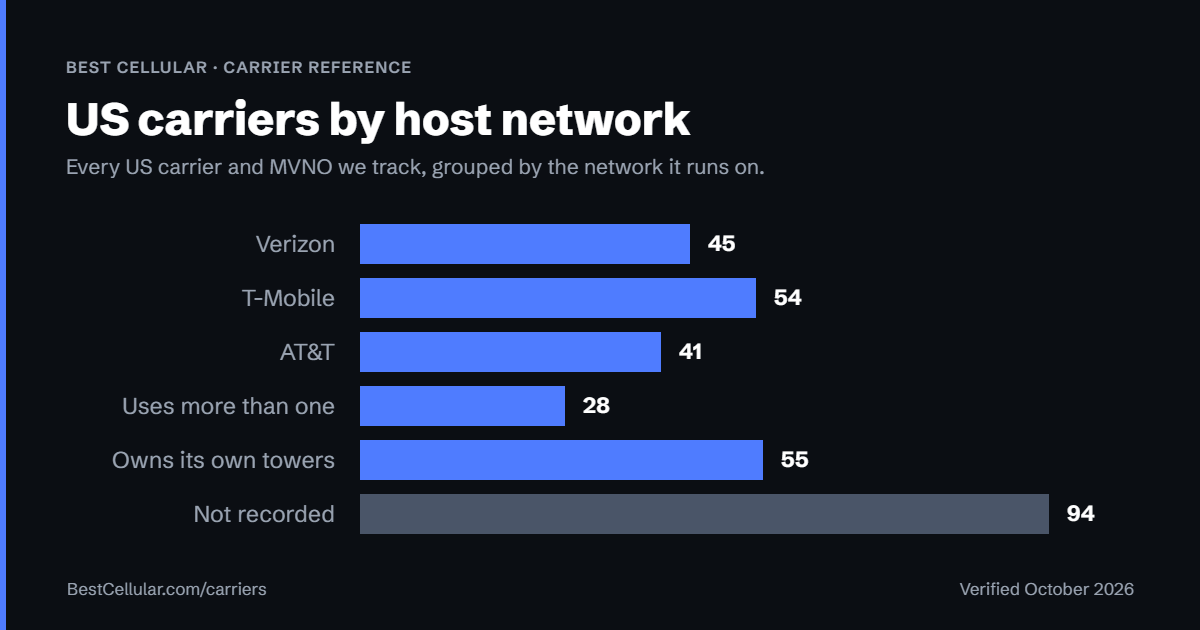
Where Xfinity Mobile customers usually go next
Xfinity runs on Verizon, so a Verizon-based carrier is the least disruptive switch — your phone is already compatible.
Common questions
How long is the Xfinity Mobile transfer PIN valid?
24 hours. If it expires before the transfer is submitted, generate a new one. There is no penalty and no limit.
Is the transfer PIN the same as my Xfinity account PIN?
No. Your account PIN is for identifying yourself to Xfinity. The transfer PIN exists only to authorise moving a number to another carrier, which is why it is generated separately and expires quickly.
Do I need a separate PIN for each line on my account?
No. Xfinity states that one security PIN can be used to port out any phone number listed on the account.
Can I get the PIN over the phone?
Not reliably. Xfinity’s documented method is the online account or app, with a one-time passcode sent to an active line. If you cannot complete that, Xfinity directs customers to a Retail Store for in-person identity verification.
Will Xfinity charge me for leaving?
There is no separate termination fee for the service itself, but any remaining balance on a device payment plan becomes due, and the phone stays locked until it is paid off.
What happens to my Xfinity Internet if I move my mobile number?
Nothing — they are separate services. But Xfinity Mobile requires an active Xfinity Internet account, so if you are cancelling both, move the phone number first.
Best Cellular is a free reference site published by Assertive Holdings, LLC. Some links on this page are affiliate links, which means we may earn a commission if you switch carriers through them, at no cost to you. It does not change what we publish. The Xfinity Mobile steps above are taken from Xfinity’s own published support guidance. Verified September 2026.
Cite this page
Sources
BestCellular.com is an independent reference, not a carrier. We read each fact above on Xfinity Mobile’s own pages. Checked October 13, 2026.
- Xfinity: How do I cancel my Xfinity Mobile service?
- Xfinity: Where can I find my Xfinity account number?
- Total Wireless: Carrier List and Info Required to Port Your Number
- Wikipedia: Xfinity (Xfinity Mobile section)
Carriers change port-out steps without notice. Confirm with Xfinity Mobile before you start a transfer, and tell us if anything here has changed.
Best Cellular. “Xfinity Mobile Account Number & PIN: Accurate 2026,” BestCellular.com. https://bestcellular.com/xfinity-mobile/
Free to reuse with credit. Licence, sources and the full dataset.
Check Xfinity Mobile before you switch
Two free tools. No sign-up, nothing stored on our side.
Xfinity Mobile APN settings
Xfinity Mobile runs on the Verizon network.
Xfinity Mobile does not publish manual APN values on its own support site.
What to do instead: Contact Xfinity Mobile support.
Open the full APN settings tool for Xfinity Mobile
Other carriers on the Verizon network
These brands use the same towers as Xfinity Mobile. Coverage is the same. Price, data priority when the network is busy, and customer service are not.
See which network every US carrier uses · Open the transfer PIN lookup