
Here is how to get your AT&T Postpaid account number and transfer PIN, and what to do with them when you move your number to another carrier.
AT&T Transfer PIN: the short answer
Get your AT&T Number Transfer PIN in the AT&T app (profile icon > Settings > Manage or remove account > Settings > Request new PIN), at att.com (Account profile > Settings > Request new PIN), or by dialing *PORT from your phone. It expires in 4 days. Your account number sits under the page number or issue date on your bill.
It is not your online password. It is not your account passcode. Give the new carrier the Number Transfer PIN only.
Before you start: turn off Wireless Account Lock
If Wireless Account Lock is on, AT&T blocks the transfer. Turn it off first.
- Open the AT&T app on a device that is active on your wireless account.
- Sign in.
- Tap the person icon.
- Select Wireless account lock.
- Tap Unlock the account.
Only users with primary or secondary access can change it. For a standalone tablet, hotspot or Wireless Home Phone, contact AT&T or visit a store.
How to get your AT&T Number Transfer PIN
Only users with primary online access can request the PIN in the app or online.
Method 1: AT&T app
- Sign in to the AT&T app.
- Tap your profile icon, then tap Settings.
- Select Manage or remove account.
- Tap Settings and scroll to Transfer phone number.
- Select Request new PIN. The PIN shows on screen.
Method 2: att.com
- Go to your account profile at att.com. Sign in if asked.
- Select Settings.
- Scroll to Transfer phone number.
- Select Request new PIN. The PIN shows on screen.
Method 3: dial *PORT
- From your AT&T phone, dial *PORT (*7678 on the keypad).
- Follow the prompts. Have your account passcode ready. You need it here.
- AT&T texts the Number Transfer PIN to you.
Method 4: by phone
AT&T’s PIN instructions list no separate phone line for personal accounts. Use *PORT from your AT&T phone. Business accounts: contact AT&T Business Wireless support. A rep generates the PIN and emails it.
Where to find your AT&T account number
Your account number is not your phone number. Find it here:
- Paper or PDF bill: under the page number or issue date, on any page.
- att.com Account overview: under “Welcome back,” or in the account selector if you have more than one account.
- att.com Account profile: select Account info. It sits under the service name.
- Billing center: under “Current balance.”
- Other options: your Customer Service Summary, the welcome email AT&T sends new customers, AT&T chat, or 611 from an AT&T wireless phone.
Copy it exactly as printed. The new carrier needs it with the PIN.
How long the AT&T Transfer PIN lasts
- Personal accounts: 4 days from the request.
- Business accounts: 14 days.
- One PIN, every line: the same PIN works for all numbers you move off the account.
- New PIN cancels old PINs: request a new one and every earlier PIN stops working.
Expired? Request a new PIN with any method above. Then give the new carrier the new one. Request it close to the day you switch.
Special cases
- Suspended account: request the PIN online or in the AT&T app only.
- Business account: only the primary user can request it. The app and *PORT do not work for business. Use your online account or AT&T Business Wireless support.
- AT&T Prepaid: no Number Transfer PIN needed. Get your prepaid account number by calling 800.901.9878 or 611 from your AT&T wireless phone. See AT&T Prepaid account number.
Do not cancel AT&T first
Keep the AT&T line active until the new carrier confirms the move. Cancel first and the number transfer can fail.
Check coverage before you port
AT&T Postpaid runs on the AT&T network, so the coverage you get at your address is AT&T coverage. Check it on AT&T’s own coverage map before you start the transfer.
Your right to keep the number is federal, not a carrier policy. The rule is the FCC’s: Portability: Keeping Your Phone Number When Changing Service Providers.
Working a counter? The AT&T Postpaid transfer PIN lookup puts these steps on one screen and texts them to the customer.
Where AT&T Postpaid customers usually go next
AT&T Postpaid runs on AT&T’s network, so the phone in your hand is already AT&T-compatible. These carriers will take it with no compatibility question.
H2O WirelessAT&T network, prepaid
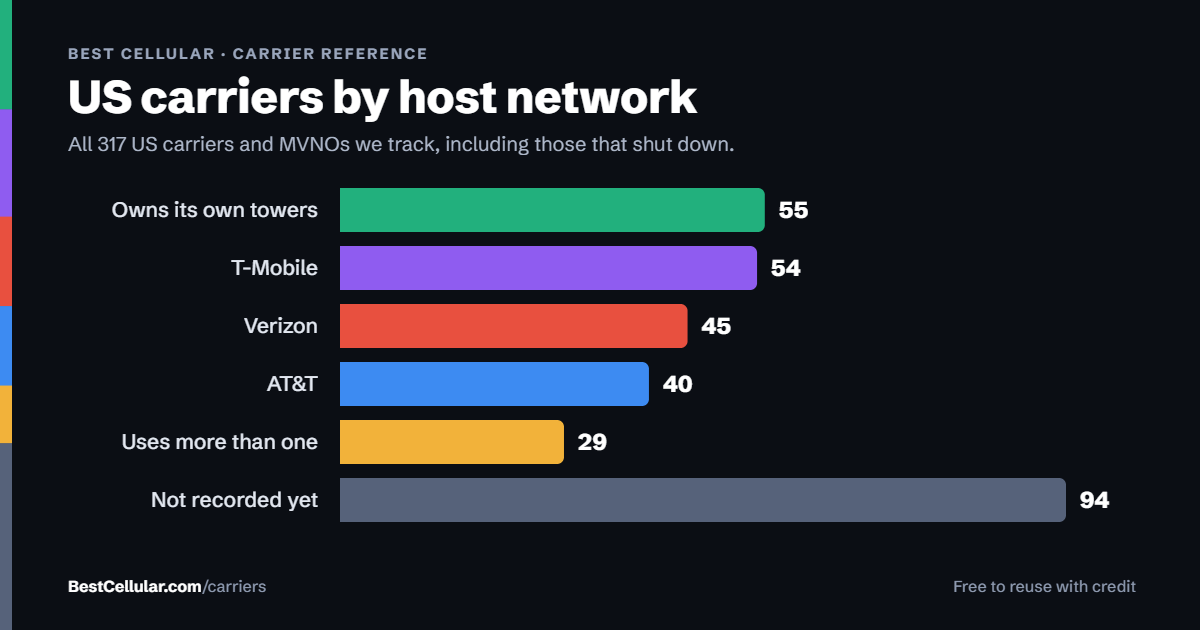
Compare every carrierEvery US carrier and MVNO, by network
Some links above are affiliate links. We may earn a commission if you switch through them, at no cost to you. We recommend by network compatibility first, not by what pays most.
AT&T Transfer PIN FAQ
What is the AT&T transfer PIN?
It is the AT&T Number Transfer PIN. It lets a new carrier move your number off AT&T. It is not your online password or account passcode. Request it in the AT&T app, at att.com, or by dialing *PORT from your AT&T phone.
How do I get my AT&T transfer PIN fast?
Dial *PORT from your AT&T phone and follow the prompts. You need your account passcode. AT&T texts the PIN to you. The app and att.com also show it on screen under Settings > Transfer phone number > Request new PIN.
How long is an AT&T transfer PIN good for?
4 days for personal accounts. 14 days for business accounts. If it expires, request a new one. A new request cancels every earlier PIN.
Why can’t I get my AT&T transfer PIN?
Three common blocks. You lack primary online access. Wireless Account Lock is on. Or you have a business account and tried the app or *PORT. Fix the one that applies and request again.
Where is my AT&T account number?
On your bill, under the page number or issue date on any page. Online, it shows under “Welcome back” on the Account overview, and under Account info in your account profile. You can also call 611 from an AT&T phone.
Do AT&T Prepaid customers need a transfer PIN?
No. AT&T says AT&T Prepaid accounts don’t need a Number Transfer PIN. Call 800.901.9878 or 611 from your AT&T phone for the prepaid account number.
Do I need a separate PIN for each line?
No. One AT&T Number Transfer PIN covers every number you move off the account.
Cite this page
Sources
BestCellular.com is an independent reference, not a carrier. We read each fact below on AT&T’s own site. Checked October 12, 2026.
- AT&T: Get a PIN to Transfer Your Wireless Number
- AT&T: Learn About Wireless Account Lock
- AT&T: Find Your AT&T Account Number
- AT&T: Find Your AT&T PREPAID Account and Wireless Number
Best Cellular. “AT&T Postpaid Account Number & PIN: Accurate 2026,” BestCellular.com. https://bestcellular.com/att-postpaid/
Free to reuse with credit. Licence, sources and the full dataset.
Check AT&T Postpaid before you switch
Two free tools. No sign-up, nothing stored on our side.
AT&T Postpaid APN settings
AT&T Postpaid runs on the AT&T network. These are the APN settings AT&T Postpaid publishes for Android.
| APN name | NXTGENPHONE |
| APN | nxtgenphone |
| MMSC | http://mmsc.mobile.att.net |
| MMS proxy | proxy.mobile.att.net |
| MMS port | 80 |
| Max message size | 600k |
| APN type | default,mms,supl,hipri |
| APN protocol | IPv4 |
| Authentication type | None |
| Bearer | Unspecified |
| MCC | 310 |
| MNC | 410 |
Other APNs AT&T Postpaid publishes
- enhancedphone for 5G-capable smartphones
Source: www.att.com · Checked 2026-09-22.
Open the full APN settings tool for AT&T Postpaid
Other carriers on the AT&T network
These brands use the same towers as AT&T Postpaid. Coverage is the same. Price, data priority when the network is busy, and customer service are not.
See which network every US carrier uses · Open the transfer PIN lookup