
UScellular is now part of T-Mobile, and most UScellular accounts have already moved to T-Mobile. Check your latest bill first: if it says T-Mobile, you leave as a T-Mobile customer. Here is how to get the account number and transfer PIN either way.
Account Number
Moved to T-Mobile: use your T-Mobile account number, shown in your T-Mobile account and on your T-Mobile bill. Still billed as UScellular: it is on your bill and in your online account, or call 888-944-9400 (611 from a UScellular phone). It is not your phone number.
Transfer PIN
Moved to T-Mobile: in the T-Life app, Account → gear icon → Permissions & controls → Transfer PIN. Only the Primary Account Holder can create it. Still on UScellular: call Customer Service at 888-944-9400 or visit a store. UScellular says the PIN is valid only for a short time (7 days for prepaid).
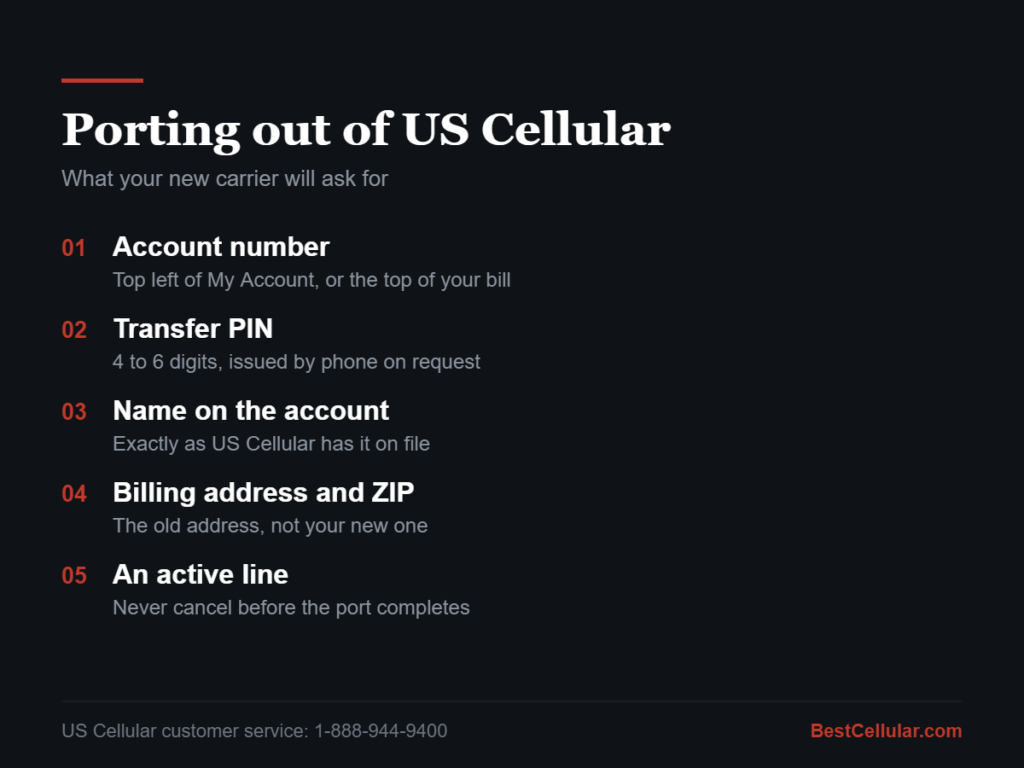
What US Cellular requires to release your number
| Required | Where it comes from |
|---|---|
| Account number | Top left of your My Account page, or the top of your paper or PDF bill |
| Transfer PIN | Call 1-888-944-9400 and ask for a transfer PIN. It is 4 to 6 digits. |
| Name on the account | Must match exactly, including middle initial if one is on file |
| Billing address and ZIP | The address US Cellular has on file, not your new address |
| Active service | The line must still be active on the day the port runs |
Your new carrier submits all of it. You never contact them to start the port, only to get the PIN.
How to find your US Cellular account number
- If your account has moved to T-Mobile, the account number is in your T-Mobile account and on your T-Mobile bill. T-Mobile asks for it when you transfer out.
- Still billed as UScellular: UScellular says to check your bill or online account.
- Still stuck? Call 888-944-9400 from any phone, or dial 611 from your UScellular phone, and ask for the account number on file.
The account number is not your phone number, and it is not the IMEI. If what you are holding is ten digits and looks like a phone number, it is the wrong number.
How to get your US Cellular transfer PIN
If your account has moved to T-Mobile, UScellular can no longer release the number. Get a T-Mobile Temporary Port Out PIN instead. In the T-Life app, with that line’s SIM active and Wi-Fi off: Account → gear icon → Permissions & controls → Transfer PIN. On T-Mobile.com, use the phone’s browser, not a computer. Turn off Port Out Protection first. Only the Primary Account Holder can create the PIN. If you are still billed as UScellular, use the steps below.
Call 1-888-944-9400 and ask for a transfer PIN, sometimes called a port-out PIN or number transfer PIN. It is generated on request. UScellular does not publish the PIN length, and says the PIN is valid only for a short time. US Cellular publishes its own transfer PIN instructions as well.
Two things trip people up here:
- A transfer PIN is not your account PIN or voicemail password. Handing your new carrier the wrong one is the single most common reason a port fails.
- Transfer PINs expire. Get the PIN the same day you start the switch, not a week ahead.
Some accounts default the transfer PIN to the last four digits of the phone number. Try it if you cannot reach support, but confirm it by phone before you rely on it.
Is US Cellular still a carrier in 2026?
Partly, and this is where most instructions on the internet are now out of date.
T-Mobile completed its acquisition of substantially all of US Cellular wireless operations on August 1, 2025, in a deal valued at roughly $4.3 billion, announced by T-Mobile on the closing date. That included the customer base, most retail stores, and a portion of the spectrum. The US Cellular brand is being retired in phases over roughly two years, so through 2026 some customers still bill as US Cellular while others have already been moved to T-Mobile.
The remaining company, renamed Array Digital Infrastructure, kept the towers and a large spectrum position. It is a tower and spectrum business. It does not sell you phone service.
What that means for your port:
- Still billed by US Cellular? Use the process on this page. It works.
- Already migrated to T-Mobile? US Cellular support cannot release the number. You need a T-Mobile account number and a T-Mobile transfer PIN instead. See our T-Mobile port-out guide.
Check your most recent bill. Whichever name is on it is the carrier that has to release your number.
Update, October 13, 2026: UScellular prepaid service ended between June 16 and July 15, 2026, and prepaid numbers not switched by then were lost. T-Mobile says UScellular accounts that did not move automatically were cancelled on September 1 and disconnected after September 30, and service can be restarted with T-Mobile for up to 60 days after September 1. After that, the number is gone for good. T-Mobile expects to finish the integration by the end of 2026.
Forgot your US Cellular PIN? Try this first
Your old UScellular account PIN was 4 digits. T-Mobile account PINs are 6 to 15 digits. For migrated UScellular business accounts, T-Mobile converted the old PIN by adding two zeros to the end. It is the first thing to try on a personal account too.
Example: a UScellular PIN of 1234 becomes 123400 at T-Mobile. T-Mobile publishes this rule on its UScellular business transition page. If it fails, reset the PIN.
Still locked out? Reset it in the T-Life app: Account → gear icon → Security → T-Mobile ID → Account PIN/Passcode. Use your own phone on the T-Mobile network with Wi-Fi off, or the reset will not load. Only the Primary Account Holder can change it. The new PIN cannot be sequential, repeated, or part of your phone number. T-Mobile’s PIN rules list every restriction.
Not moved yet? UScellular still resets PINs at 888-944-9400, 611 from your phone, or any store that services UScellular accounts.
Account PIN vs. transfer PIN: they are not the same code
The account PIN proves who you are when you call or log in. The transfer PIN authorizes a port and expires in about 7 days. Your new carrier needs the transfer PIN. Giving it your account PIN is the most common reason a US Cellular port fails.
How to pay a US Cellular bill or check your balance
- Account moved to T-Mobile: pay and check your balance in the T-Life app or at T-Mobile.com. Your UScellular login stops working after the move. You need a T-Mobile ID.
- Still billed as UScellular: use the UScellular My Account app or call 888-944-9400.
Most UScellular.com support pages now redirect to T-Mobile Support. If you land on T-Mobile’s site, that is expected.
How to cancel US Cellular without losing your number
Do not call to cancel. Port the number to your new carrier first. The US Cellular line closes on its own the moment the port completes. Cancel first and the number goes back to the carrier.
Prepaid customers: UScellular stopped prepaid refills on June 16, 2026. Prepaid customers who switched to T-Mobile with a balance under $1,000 had it moved to their T-Mobile account within one to two billing cycles, according to UScellular.
Locked out of your US Cellular account
If your UScellular login suddenly fails, your account has most likely moved to T-Mobile. Download T-Life, create a T-Mobile ID with the phone number on the account, and use the converted 6-digit PIN above. Still stuck? Call T-Mobile at 611 from your phone.
Five mistakes that kill a port
- Cancelling service first. A cancelled number is released back to the carrier and is usually gone for good. Port first. The old line closes automatically when the port completes.
- Using the account PIN instead of the transfer PIN. Different codes, different purposes.
- A name mismatch. If the account reads “Robert” and you submit “Bob,” the port rejects.
- The wrong address. Ports validate against the billing address US Cellular has on file, not where you live now.
- An unpaid device balance. It will not block the port, but the full remaining balance comes due immediately once the line closes. Know the number before you start.
How long the port takes
A single consumer line usually completes within a few hours and almost always inside one business day. Business accounts and multi-line ports take two to five business days. Your US Cellular line keeps working the entire time. Service cuts over only when the port finishes.
If a port sits longer than 24 hours, the holdup is almost always a mismatch in the five fields above. Your new carrier can tell you which one rejected.
US Cellular contact numbers
| Purpose | Number |
|---|---|
| Customer service and transfer PIN | 1-888-944-9400 |
| Sales | 1-888-289-8722 |
| From your US Cellular phone | 611 |
About the network
US Cellular styles its own name as one word, “UScellular,” after its 2020 rebrand. Both spellings refer to the same carrier and the same porting process.
US Cellular ran its own LTE and 5G network across parts of the Midwest, New England, the Mid-Atlantic, and the Pacific Northwest, with roaming elsewhere. Its CDMA network was retired years ago, along with the rest of the industry. Any guide still telling you US Cellular runs on CDMA or on the old Sprint network was written before 2022 and should not be trusted for anything else on the page either.
Because the customer base now sits on T-Mobile, an unlocked phone that worked on US Cellular will generally work on T-Mobile and on T-Mobile-based providers. Confirm band support before you buy anything.
Frequently asked questions
Can I port out of US Cellular without calling them?
You can find the account number online, but the transfer PIN has to be requested. Plan on one call.
Does US Cellular charge a fee to port out?
No. Federal rules prohibit a carrier from charging you to take your number elsewhere. Any final month of service and any remaining device balance are still owed.
Can I keep my number if my account is past due?
Yes. A balance does not block a port. It is a debt, not a hold on the number.
What if my number already moved to T-Mobile?
Then T-Mobile is your carrier of record and issues the account number and transfer PIN. US Cellular cannot release a number it no longer holds.
Can I port a US Cellular number to a prepaid carrier?
Yes. Number portability applies in both directions, postpaid to prepaid included.
Next step
Have the account number and transfer PIN in hand before you sign up anywhere. Our step-by-step guide to switching carriers walks the rest of it, and the carrier database has the same account number and PIN instructions for every other US carrier.
Check coverage before you port
US Cellular customers now run on the T-Mobile network. T-Mobile completed its acquisition of US Cellular’s wireless operations on August 1, 2025 and reports that the networks have been integrated, so a phone that worked on US Cellular will generally work on T-Mobile. Check the T-Mobile coverage map at your address before you port. Source: T-Mobile.
Your right to keep the number is federal, not a carrier policy. The rule is the FCC’s: Portability: Keeping Your Phone Number When Changing Service Providers.
Working a counter? The US Cellular transfer PIN lookup puts these steps on one screen and texts them to the customer.

Where US Cellular customers usually go next
US Cellular customers run on T-Mobile, so a phone that worked on US Cellular will generally work on T-Mobile. Check your IMEI against the new carrier’s compatible device list before you switch. Dial *#06# to get it.
T-MobileSame network, no compatibility risk
VerizonCheck your IMEI first
Compare every carrierEvery US carrier and MVNO, by network
Some links above are affiliate links. We may earn a commission if you switch through them, at no cost to you. We recommend by network compatibility first, not by what pays most.
Questions about US Cellular
Can I keep my phone number when I leave US Cellular?
Yes. Federal number portability rules let you take a working number to a new carrier. US Cellular cannot refuse the transfer or charge you to release the number.
Should I cancel US Cellular before I port my number out?
No. Cancel first and the number is released, which ends your right to move it. Keep the US Cellular line active until the new carrier confirms the port completed.
How long does a port out from US Cellular take?
A simple wireless transfer usually completes within one business day once the new carrier submits the correct US Cellular account number and transfer PIN.
Does US Cellular run on its own towers?
Not anymore. UScellular ran its own LTE and 5G network until T-Mobile bought its wireless business on August 1, 2025. Customers now run on the T-Mobile network. The towers stayed with Array Digital Infrastructure, the renamed parent company, which leases them to carriers.
Cite this page
Sources
BestCellular.com is an independent reference, not a carrier. We read each fact above on UScellular’s and T-Mobile’s own pages, plus coverage of T-Mobile’s earnings for the integration timeline. Checked October 13, 2026.
- T-Mobile Newsroom: T-Mobile Completes UScellular Deal (August 1, 2025)
- UScellular: UScellular is now part of T-Mobile
- UScellular: Port Number FAQ
- UScellular: Prepaid FAQ (shutdown dates, 7-day PIN)
- T-Mobile: UScellular is now part of T-Mobile (accounts that did not move)
- T-Mobile: Transfer your phone number
- Investing.com: T-Mobile Q1 2026 results and UScellular integration timeline
Carriers change port-out steps without notice. Confirm with T-Mobile or UScellular before you start a transfer, and tell us if anything here has changed.
Best Cellular. “US Cellular Account Number & PIN: Accurate 2026,” BestCellular.com. https://bestcellular.com/us-cellular/
Free to reuse with credit. Licence, sources and the full dataset.
Check US Cellular before you switch
Two free tools. No sign-up, nothing stored on our side.
Other carriers we track
Account numbers, transfer PINs and port-out steps for other carriers in the database.
See which network every US carrier uses · Open the transfer PIN lookup