
Here is how to get your T-Mobile Postpaid account number and transfer PIN, and what to do with them when you move your number to another carrier.
T-Mobile Transfer PIN: the short answer
Only the Primary Account Holder can create a T-Mobile Transfer PIN. Turn off Port Out Protection, then open the T-Life app on the T-Mobile network with Wi-Fi off: Account > gear icon > Permission & controls > Transfer PIN > Create PIN. Your T-Mobile account number is on the T-Mobile.com welcome screen and the first page of your bill.
Step 1: turn off Port Out Protection
Port Out Protection blocks transfers to another carrier. If it is on, your Transfer PIN will not work. T-Mobile adds it line by line, so check every line you plan to move.
- Postpaid: only the Primary Account Holder can remove it. Authorized Users can add it, not remove it.
- Prepaid: any line user can contact T-Mobile to remove it, after passing an extra security check. Prepaid PINs will not display until it is off.
Step 2: create your T-Mobile Transfer PIN
T-Mobile calls it the Temporary Port Out PIN. Not the Primary Account Holder? Ask that person to create it.
Method 1: T-Life app (postpaid)
- On your phone, turn Wi-Fi off. Stay on the T-Mobile network.
- Open the T-Life app and log in.
- Tap Account (formerly Manage).
- Tap the gear icon.
- Select Permission & controls.
- Select Transfer PIN.
- Tap Create PIN if prompted, then Okay.
Method 2: T-Mobile.com (postpaid)
Use the browser on your phone, on the T-Mobile network. Not a desktop computer.
- Log in at T-Mobile.com.
- Open your name drop-down.
- Select Profile.
- Select Permissions & controls.
- Select Transfer PIN.
- Tap Create PIN, then Okay.
Method 3: T-Mobile Prepaid
- Turn off Port Out Protection first.
- Log in at T-Mobile.com.
- Choose My T-Mobile.
- Select My Profile.
- Select Request Transfer PIN, then Get a Transfer PIN.
Method 4: call T-Mobile
T-Mobile’s support page lists 1-800-937-8997 for help getting a Transfer PIN. General Customer Care is 1-800-T-Mobile (1-800-866-2453).
No dial code
T-Mobile’s transfer page lists no dial code for the Transfer PIN. Use T-Life, T-Mobile.com or a call.
PIN won’t load? Fix these first
- Turn Wi-Fi off and use the T-Mobile network.
- Turn off any private VPN.
- On iPhone, turn off iCloud Private Relay: Settings > [your name] > iCloud > Private Relay > Turn off until tomorrow.
- Confirm Port Out Protection is off on that line.
- Confirm you are the Primary Account Holder.
T-Mobile account number: where to find it
The new carrier needs your T-Mobile account number with the Transfer PIN. It is not your phone number.
- T-Mobile.com: log in. Your account number is on the welcome screen.
- Paper bill: on the first page.
T-Mobile Prepaid (Pay In Advance) accounts use the phone number as the main identifier.
How long the T-Mobile Transfer PIN lasts
T-Mobile’s transfer page does not publish a validity period. Create the PIN on the day you switch. If the new carrier rejects it, go back to Transfer PIN and create a new one.
Do not cancel T-Mobile first
Keep the T-Mobile line active until the new carrier confirms the move.
Brands that became T-Mobile
If you are looking for one of these, its own page carries the detail for that era.
- Sprint Postpaid — Sprint merged into T-Mobile on April 1, 2020. A surviving Sprint postpaid line is a T-Mobile account today.
- US Cellular — T-Mobile acquired its wireless operations in a deal that closed on August 1, 2025.
- MetroPCS — rebranded by T-Mobile as Metro by T-Mobile.
Check coverage before you port
T-Mobile Postpaid runs on the T-Mobile network, so the coverage you get at your address is T-Mobile coverage. Check it on T-Mobile’s own coverage map before you start the transfer.
Your right to keep the number is federal, not a carrier policy. The rule is the FCC’s: Portability: Keeping Your Phone Number When Changing Service Providers.
Working a counter? The T-Mobile Postpaid transfer PIN lookup puts these steps on one screen and texts them to the customer.
Where T-Mobile Postpaid customers usually go next
T-Mobile Postpaid runs on T-Mobile’s network, so the phone in your hand is already T-Mobile-compatible. These carriers will take it with no compatibility question.
Metro by T-MobileT-Mobile network, prepaid
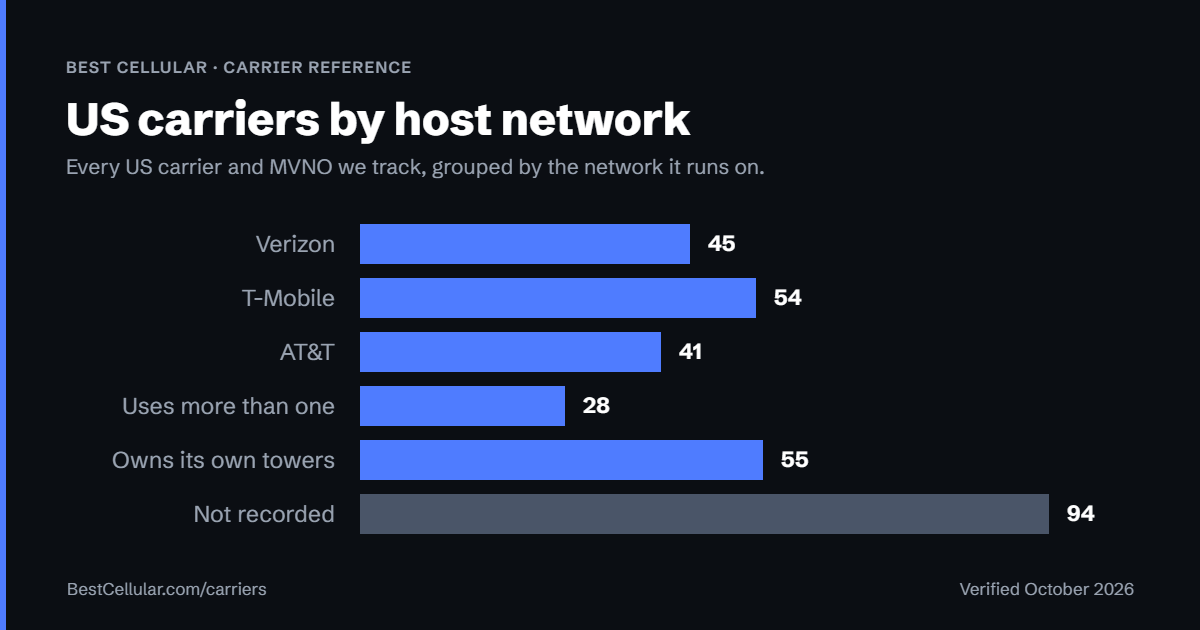
Compare every carrierEvery US carrier and MVNO, by network
Some links above are affiliate links. We may earn a commission if you switch through them, at no cost to you. We recommend by network compatibility first, not by what pays most.
T-Mobile Transfer PIN FAQ
How do I get my T-Mobile transfer PIN?
Turn off Port Out Protection. Then open T-Life on the T-Mobile network with Wi-Fi off and tap Account > gear icon > Permission & controls > Transfer PIN > Create PIN. Only the Primary Account Holder can do this.
Where is my T-Mobile account number?
Log in at T-Mobile.com. It is on the welcome screen. It is also on the first page of your bill. It is not your phone number.
Why can’t I see Transfer PIN in T-Life?
You may not be the Primary Account Holder. You may be on Wi-Fi or a VPN. Turn Wi-Fi off, turn off any VPN or iCloud Private Relay, and log in again on the T-Mobile network.
Why was my T-Mobile transfer PIN rejected?
Port Out Protection is likely still on for that line. T-Mobile says to disable it before using the Temporary Port Out PIN. The Primary Account Holder must turn it off on postpaid accounts.
How do T-Mobile Prepaid customers get a transfer PIN?
Turn off Port Out Protection. Log in at T-Mobile.com, choose My T-Mobile > My Profile > Request Transfer PIN > Get a Transfer PIN.
Can I get a T-Mobile transfer PIN on a computer?
For postpaid, T-Mobile says to use the browser on your phone, on the T-Mobile network, not a desktop. Or use the T-Life app.
How long does a T-Mobile transfer PIN last?
T-Mobile does not publish a validity period on its transfer page. Create it on the day you switch. If it is rejected, create a new one under Transfer PIN.
Cite this page
Sources
BestCellular.com is an independent reference, not a carrier. We read each fact below on T-Mobile’s site. Checked October 12, 2026.
- T-Mobile: Transfer your phone number
- T-Mobile: Find your account number
- T-Mobile Community: staff answer on prepaid account identifiers
Best Cellular. “T-Mobile Postpaid Account Number & PIN: Accurate 2026,” BestCellular.com. https://bestcellular.com/t-mobile-postpaid/
Free to reuse with credit. Licence, sources and the full dataset.
Check T-Mobile Postpaid before you switch
Two free tools. No sign-up, nothing stored on our side.
T-Mobile Postpaid APN settings
T-Mobile Postpaid runs on the T-Mobile network. These are the APN settings T-Mobile Postpaid publishes for Android.
| APN name | T-Mobile |
| APN | fast.t-mobile.com |
| MMSC | http://mms.msg.eng.t-mobile.com/mms/wapenc |
| APN type | default,supl,mms |
| APN protocol | IPv4/IPv6 |
| Roaming protocol | IPv4/IPv6 |
| Bearer | Unspecified |
Other APNs T-Mobile Postpaid publishes
- epc.tmobile.com for non-LTE devices
Source: www.t-mobile.com · Checked 2026-09-22.
Open the full APN settings tool for T-Mobile Postpaid
Other carriers on the T-Mobile network
These brands use the same towers as T-Mobile Postpaid. Coverage is the same. Price, data priority when the network is busy, and customer service are not.
See which network every US carrier uses · Open the transfer PIN lookup