
Here is how to get your Spectrum Mobile account number and transfer PIN, and what to do with them when you move your number to another carrier.
Account Number
Sign in to your Spectrum account and open the Billing tab. Your Spectrum Mobile account number is listed at the top of your statement – not in the mobile section of the app.
Transfer PIN
Generated on demand from your Spectrum online account or the My Spectrum App. It is six digits and usable for 72 hours.
How to generate your Spectrum Mobile Transfer PIN
Add a mobile contact number to your account first. Spectrum cannot issue the PIN without one, which blocks anyone whose only contact number on file is the Spectrum line they are leaving.
- Sign in to your Spectrum account on the web or open the My Spectrum App.
- Select Services, then select Mobile.
- Choose the line on your account you are transferring.
- Select Get Transfer PIN.
- Choose a contact method to receive your passcode.
- When prompted, enter the passcode and select Continue.
- Select the mobile phone number you want the transfer PIN sent to.
- Select Send and Continue. The PIN is generated and also shown on screen – write it down there rather than waiting for the message.
Before you start the transfer
- Do not cancel Spectrum Mobile first. Spectrum states it directly: do not cancel until the number has successfully transferred to the new carrier.
- Generate the PIN immediately before you switch. Seventy-two hours is short, and an expired PIN is the single most common Spectrum port rejection.
- Make sure a mobile contact number is on the account. Add one under contact preferences, or the Get Transfer PIN screen will not complete.
- Tablets cannot be transferred. Spectrum states it is unable to transfer phone numbers between tablets.
Check coverage before you port
Spectrum Mobile runs on the Verizon network, so the coverage you get at your address is Verizon coverage. Check it on Verizon’s own coverage map before you start the transfer.
Your right to keep the number is federal, not a carrier policy. The rule is the FCC’s: Portability: Keeping Your Phone Number When Changing Service Providers.
Working a counter? The Spectrum Mobile transfer PIN lookup puts these steps on one screen and texts them to the customer.
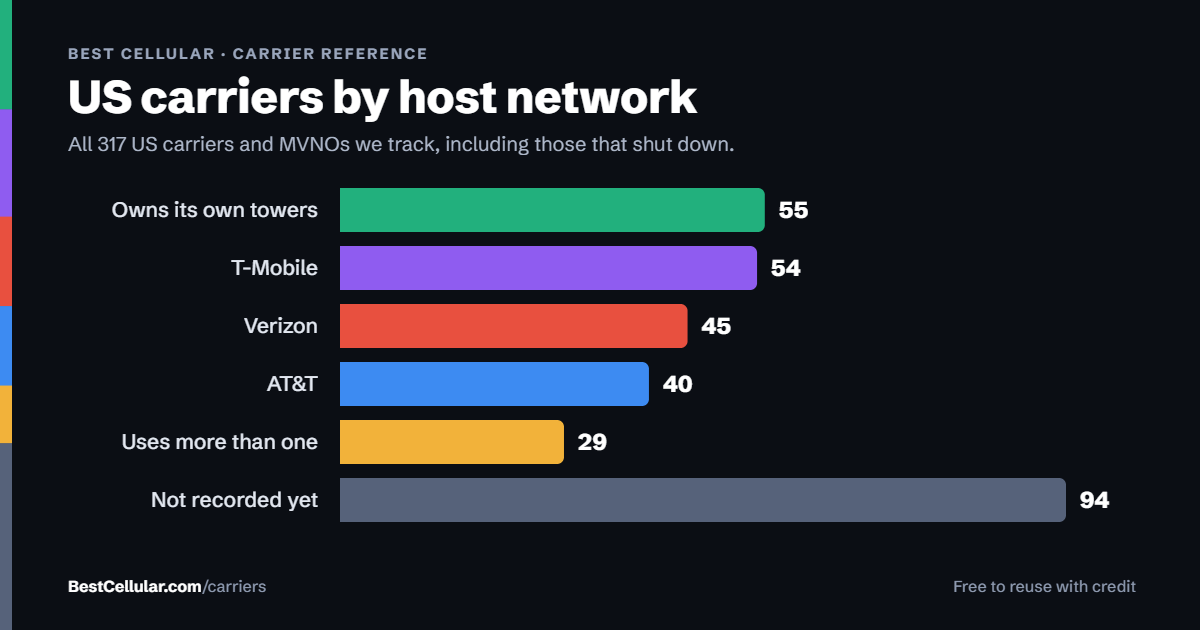
Same towers, different price
Spectrum Mobile runs on Verizon’s network
Charter states in its own annual report that Spectrum Mobile leverages the Verizon cellular network for nationwide coverage. If Verizon coverage is what works where you live, you can keep the same towers and still leave Spectrum.
Total WirelessVerizon network, Verizon owned. Prepaid, no credit check.See how to switch →
VisibleVerizon-owned, Verizon networkSee how to switch →
Compare every carrierEvery US carrier and MVNO, by networkBrowse the directory →
Sorted by price, cheapest first – not by what pays us. We filter by network first so you can check the coverage claim yourself. Best Cellular is not a wireless carrier and does not sell service. Some links on this site may earn a commission. Full disclosure.
Spectrum Mobile contact information
- Spectrum Mobile support: 866-782-2681, available 24/7
- Add or upgrade Spectrum Mobile service: 866-991-6500, 7:00AM – 11:00PM Eastern
- Spectrum Mobile information line: 833-224-6603
- Chat: live agent 24/7 at spectrum.net; Spanish-speaking agents 11:00AM – 8:00PM Eastern
- No dedicated porting line is published – general Spectrum Mobile support handles transfers
Common questions about leaving Spectrum Mobile
What towers does Spectrum Mobile use?
Verizon towers. Charter Communications states in its own SEC filing that it leverages the Verizon cellular network to provide nationwide coverage on 4G LTE and 5G. Spectrum’s consumer-facing pages never name Verizon – they say only “America’s most reliable 5G network” – which is why so many comparison sites get this wrong.
What network does Spectrum Mobile use?
Verizon, for residential customers. There is a 2026 change worth knowing: Charter signed a multi-year agreement with T-Mobile in July 2025 to deliver mobile service to Spectrum Business customers, launching in 2026. Residential Spectrum Mobile stays on Verizon.
How long is a Spectrum Mobile Transfer PIN good for?
Seventy-two hours. Spectrum states the six-digit Transfer PIN is only usable for 72 hours from when it is generated. If it lapses, generate another one – there is no limit.
Why did my Spectrum Mobile port-out get rejected?
Three causes account for most of them: giving the new carrier the old four-digit account security code instead of the generated six-digit Transfer PIN, letting the PIN pass its 72-hour window, or an account-number mismatch because the number was taken from the app rather than the top of the billing statement.
Where is my Spectrum Mobile account number?
On your statement, under the Billing tab of your Spectrum account. It is printed at the top. It is not shown in the mobile section of the My Spectrum App.
Do I have to cancel Spectrum Mobile before switching?
No. Spectrum explicitly asks you not to cancel until the number has successfully transferred. The port closes the line for you.
Cite this page
Sources
BestCellular.com is an independent reference, not a carrier. Spectrum’s own support pages sit behind a sign-in wall we could not read, so the steps above come from the secondary sources below. Confirm them in your Spectrum account before you start. Checked October 13, 2026.
- Spectrum: Spectrum Mobile
- Mediacom Knowledge Base: account information for your current mobile carrier (Spectrum Transfer PIN steps)
- US Mobile: Porting out from Spectrum Mobile
- Charter newsroom: T-Mobile network for Spectrum Mobile business customers (July 22, 2025)
Carriers change port-out steps without notice. Confirm with Spectrum Mobile before you start a transfer, and tell us if anything here has changed.
Best Cellular. “Spectrum Mobile Account Number & PIN: Accurate 2026,” BestCellular.com. https://bestcellular.com/spectrum-mobile/
Free to reuse with credit. Licence, sources and the full dataset.
Check Spectrum Mobile before you switch
Two free tools. No sign-up, nothing stored on our side.
Spectrum Mobile APN settings
Spectrum Mobile runs on the Verizon network.
Spectrum Mobile states that these settings are not provided, and advises against entering an APN by hand.
What to do instead: Contact Spectrum Mobile support. Manual APN entry is not supported.
Open the full APN settings tool for Spectrum Mobile
Other carriers on the Verizon network
These brands use the same towers as Spectrum Mobile. Coverage is the same. Price, data priority when the network is busy, and customer service are not.
See which network every US carrier uses · Open the transfer PIN lookup